Dashboard Tour
When you log in to app.archivers.ai for the first time, you'll go through a quick setup wizard — Onboarding — to configure your organisation. Once complete, you'll land on the Dashboard. Here's what you're looking at.
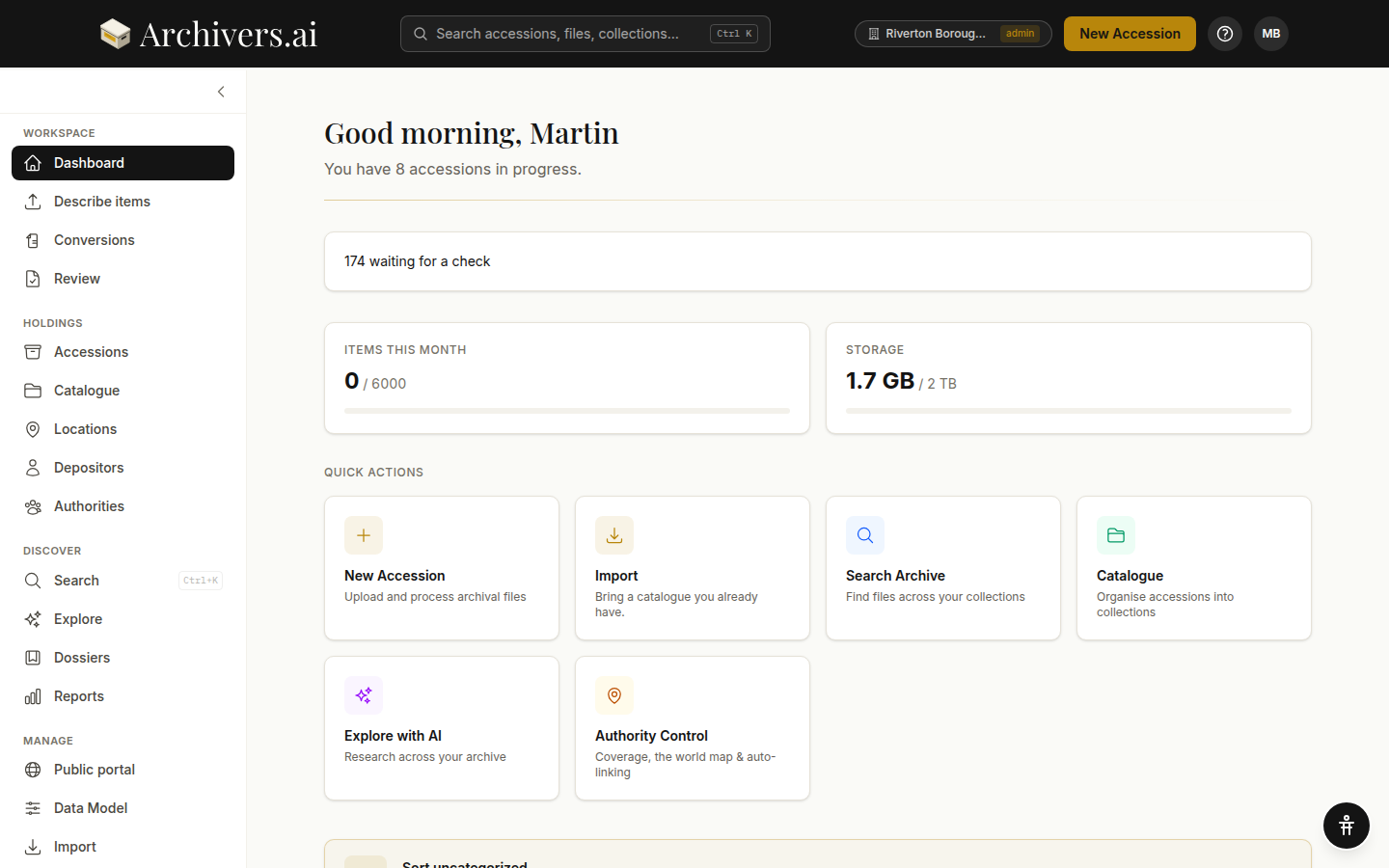
The sidebar
The left-hand sidebar is your main navigation:
| Item | What it is |
|---|---|
| WORKSPACE | |
| Dashboard | This home screen — recent activity, usage, in-progress accessions |
| Describe items | Start a new accession and let the AI draft a record for each file — see Creating an accession |
| Conversions | Turn batches of records into another layout or format to a template — see What is Conversions? |
| Retroconvert | Turn paper catalogues and card indexes into records — see What is retroconversion? |
| Review | The queue of drafted records waiting for someone to check them — see Reviewing records |
| HOLDINGS | |
| Accessions | Every batch of files you've taken in, and the statutory accession register |
| Catalogue | Your archival hierarchy (fonds → series → sub-series) — see What is a fond? |
| Locations | Where material physically lives, and what's out on loan — see Setting up storage locations |
| Depositors | The people and organisations material came from — see What is a depositor? |
| Authorities | The linked-data layer — subjects, people, places, organisations — see What is an authority? |
| DISCOVER | |
| Search | Full-text search across files, metadata, accessions, and the catalogue (Ctrl+K from anywhere) |
| Explore | AI-powered research over your archive — ask questions, get cited answers |
| Dossiers | Thematic research folders pulled together from across the archive — see What is a dossier? |
| Reports | Summaries of what's in the archive and what's been done to it |
| MANAGE | |
| Public portal | Your public-facing catalogue — see Enabling the portal |
| Data Model | The metadata schema — what fields appear on documents, photographs, artefacts, audio, video, collections — see What is the Data Model? |
| Import | Bring in an existing catalogue, collections, accessions register, locations, or an arrangement scheme — see Importing a structure |
| Exports | Toggle export formats on/off, customise how fields map to each format — see Export formats |
| Settings | Your name, AI defaults, accession numbering, security, plan and usage — see Your profile |
The Dashboard home screen
Usage strip. Two cards at the top show items processed this month against your monthly quota, and storage used against your storage cap.
Waiting for a check. When records are waiting on someone, a card says how many and links straight to the Review desk — see Reviewing records.
Still to process. A one-line summary of outstanding processing work, with a warning line if anything looks stuck.
Quick actions. Shortcuts to the things you do most:
- New Accession — start uploading
- Import — bring in a spreadsheet (editors only)
- Search Archive — jump to full-text search
- Catalogue — open your archival structure (fonds, series, and assigned accessions)
- Explore with AI — start a research session
- Authority Control — coverage, the world map and auto-linking
- View Accessions — browse all your accessions
- My Profile — manage your account settings
Getting started. On a new workspace, a dismissible checklist tracks the first four steps — create an accession, process the items, review and accept the results, complete or export an accession.
In Progress. Accessions you've started but haven't completed yet — pick up where you left off.
The top bar
- ARCHIVERS.AI logo links back to the Dashboard
- Search accessions, files, collections… — the search box, or
Ctrl+K(⌘Kon a Mac) from anywhere - New Accession — primary CTA, available from every screen
- Account menu — your organisation and role, and Sign out
- Accessibility menu — floating button in the bottom-right corner (see below)
Accessibility features
Look for the accessibility icon (a figure with arms raised) in the bottom-right corner of every page. Click it to reveal options:
- High contrast — stronger borders and darker text
- Dyslexia-friendly font — switches to an open-letter typeface
- Reduced motion — suppresses non-essential animation
- Text size — A, A+ or A++
- Reset to defaults — puts all four back
Your preferences are saved on this device and apply across all pages. Press Tab from anywhere to reveal a Skip to main content link that jumps past the navigation.
What's next?
- Upload your first accession — the end-to-end walkthrough
- Key concepts — what fond, accession, authority, and dossier actually mean