What Is the Data Model?
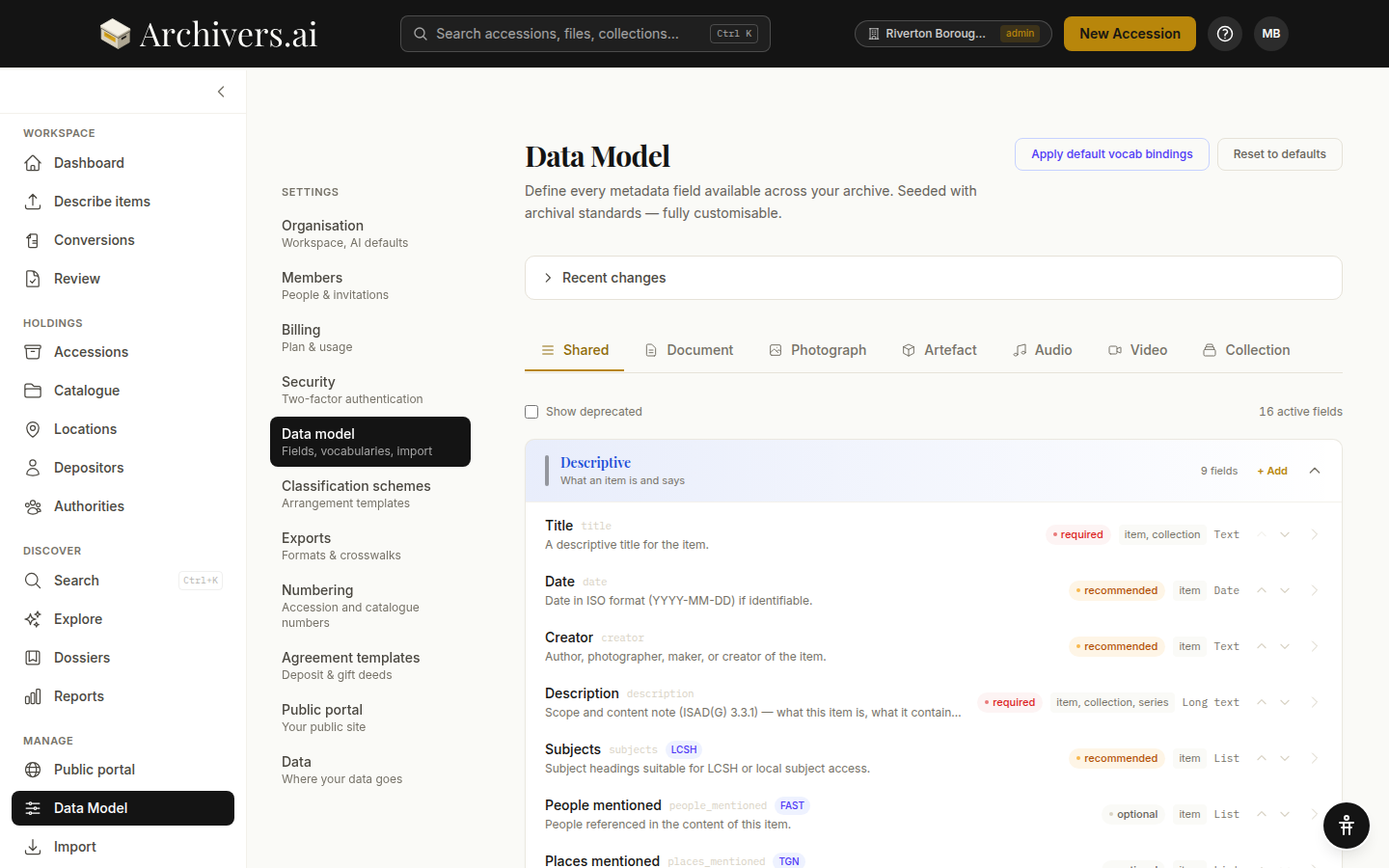
The Data Model defines every metadata field that exists in your archive — what shows up on documents, photographs, artefacts, audio items, video items, and at the collection level. It's seeded with archival-standards defaults (ISAD(G), DACS, Dublin Core, Spectrum) and fully customisable.
Find it at Settings → Data Model.
Why it matters
- The wizard surfaces these fields — when you create an accession, the Custom Fields step asks about each field your model has defined.
- The item review screen renders these fields — what you see when you expand a row on the Items tab.
- The AI populates these fields — what the model extracts is shaped by which fields are active and what they expect.
- Exports map from these fields — every format's mapping starts here.
Change the Data Model and every part of the platform that touches metadata updates accordingly.
How it's organised
The Data Model is split by category:
- Shared — fields that appear on every category (Title, Date, Creator, Description, Subjects, …)
- Document — bibliographic fields (publisher, language, page count, …)
- Photograph — image-specific fields (caption, photographer, technique, …)
- Artefact — conservation-style fields (materials, dimensions, condition, …)
- Audio — audio-specific fields (runtime, format, sample rate, transcript, …)
- Video — video-specific fields (runtime, resolution, codec, transcript, …)
- Collection — fond / sub-fond / series level fields (scope and content, biographical history, …)
Within each category, fields sit in one of three pillars:
- Descriptive — what an item is and says
- Administrative — access, rights, provenance
- Structural — format, relationships, physical
Your own fields go into whichever pillar suits them; there's no separate "custom" bucket.
The default schema
The defaults are derived from archival standards. A few examples:
Documents — Descriptive:
- Title (required, Text)
- Date (recommended, Date)
- Creator (recommended, Text)
- Description (required, Long text)
- Subjects (recommended, List, bound to LCSH)
- People mentioned (optional, List)
- Places mentioned (optional, List)
- Organisations mentioned (optional, List)
Documents — Administrative:
- Access rights (required)
- Sensitivity level (required, pick from a list: Public / Restricted / Closed)
Artefacts — Structural and Descriptive:
- Condition (recommended, Long text)
- Materials (recommended, List, bound to AAT)
- Dimensions (optional, Text)
Each field also declares the hierarchy levels it applies to — fonds, series, file, item and so on, plus collection.
You can see and edit every default field. Deprecated defaults are hidden by default; toggle Show deprecated to see them.
What you can change
For every field:
- Display label and help text
- Requirement level — required / recommended / optional
- Pillar and hierarchy levels
- Validation rules — a pattern, minimum and maximum length, date ranges
- Vocabulary binding — switch the bound vocabulary, or set it back to Freeform — no vocabulary
A field's machine key, category and data type are fixed once it is created — the data-type box shows a padlock and the word Immutable. Get those wrong and the answer is to deprecate the field and add a new one.
Across the page, you can:
- Add new fields in any pillar
- Reorder fields within a pillar with the move up / move down arrows
- Deprecate unused fields (hidden but data preserved) and Restore them later
- Apply default vocab bindings — sets standard vocabularies (LCSH, AAT, TGN, FAST) on fields that don't already have one. It never overwrites a binding you've chosen
- Reset to defaults — re-adds any deleted seed fields. Fields you've edited or deprecated are left untouched
A collapsed Recent changes panel at the top of the page records who changed what.
Who can edit it
The Data Model is always org-wide — everyone in the organisation sees the same schema. There is no personal version of it.
Editing it needs a paid plan and the admin role. On Community the page shows an upgrade panel — "Tailor the data model to your institution's standards. Available on Starter and above." Non-admins on a paid plan see the schema read-only: "View the metadata schema for your organisation. Contact an admin to make changes."
One deliberate widening: a Member adding a field from a record they're cataloguing can do so without waiting for an admin.
Bringing in an existing catalogue
If you're migrating from another catalogue system, you can import your existing fonds hierarchy:
- Import collections — bring in a CSV spreadsheet or EAD3 XML finding aid and convert it to a fonds structure.
- Retroconvert a catalogue — paste in a typed catalogue (plain text or table format) and let the platform parse it into a structured hierarchy.
Both tools are in the Bring in an existing catalogue section on this page — "One-off migration tools for populating the catalogue from what you already have." The section is visible whether or not you can edit the schema itself.
After import, you'll have a fonds skeleton ready to assign accessions to. See Importing a structure for detailed steps.
There is no way to import a data-model schema from another system — fields are added on this page.
What's next?
- Customising fields — the field-level editor
- Custom fields — how added fields appear in the accession workflow
- Applying domain packs — pre-built schemas for specific domains