Custom Metadata Fields
Archivers.ai ships with archival-standards-derived defaults for every category — but every organisation has its own internal fields (donor reference, accession register number, exhibition history). Custom fields are added to the Data Model, and they appear on the accession wizard and the item review screen automatically.
Where custom fields live
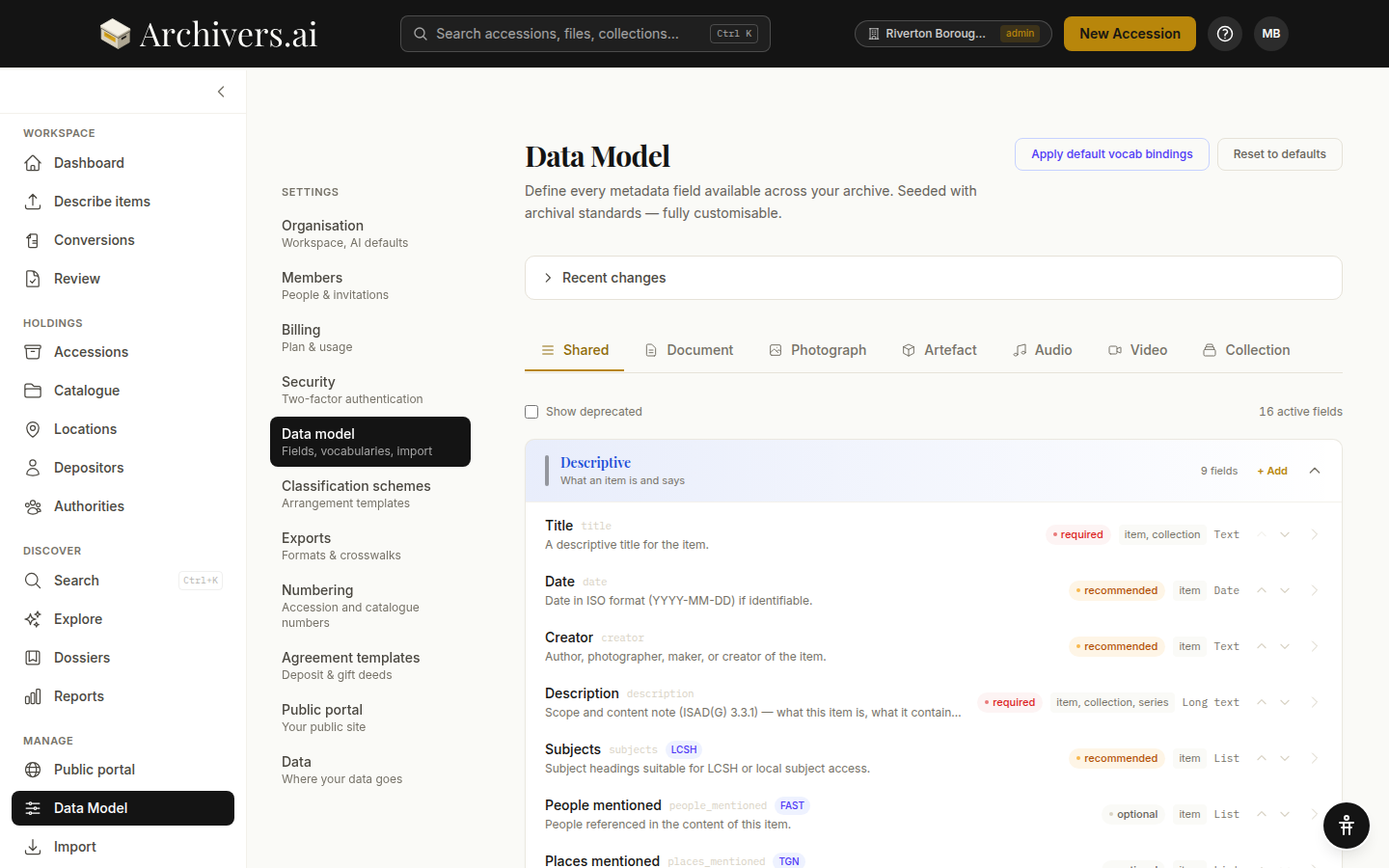
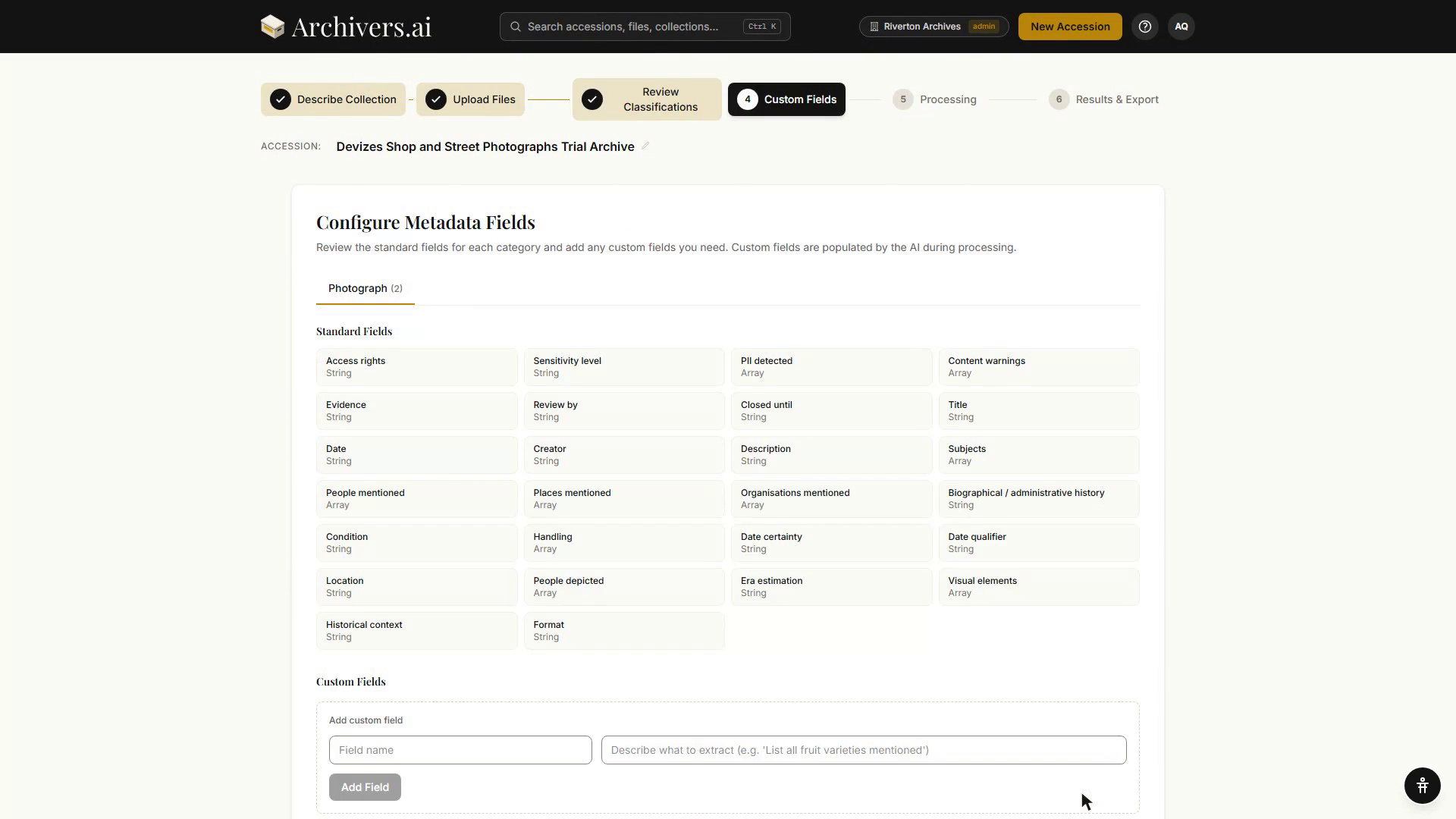
There are two places. Fields you want on every accession are managed from Settings → Data Model — a field added there today applies to every accession you create from now on, in the relevant category. Fields you only need for the batch in hand can be added in the accession wizard itself, at step 4.
See What is the Data Model? for the full guide.
In the accession wizard, step 4 — Configure Metadata Fields — has a tab per category present in the batch, listing that category's Standard Fields and Custom Fields, with an Add custom field box where a field name and a description of what to extract are all you need before clicking Add Field. Fields added here apply to this accession only; the AI populates them during processing.
Field anatomy
Every field has:
| Property | Options |
|---|---|
| Label | Human-readable name (Donor reference) |
| Key | Machine-readable identifier (donor_reference) |
| Category scope | Shared / Document / Photograph / Artefact / Audio / Video / Collection |
| Entity scope | Item / Collection / Series |
| Type | Text / Long text / Date / Number / Enum / List |
| Necessity | Required / Recommended / Optional |
| Vocab binding | Optional — bind to LCSH / FAST / Getty AAT / TGN / VIAF / GeoNames / Wikidata or a local vocabulary |
| Help text | One line shown beneath the field |
The defaults that ship are seeded from archival standards — Title, Date, Creator, Description, Subjects (LCSH-bound), People mentioned (FAST-bound), Places mentioned (TGN-bound), Access rights, Sensitivity level, and more. Apply default vocab bindings restores them if you've drifted.
Adding a field
- Settings → Data Model.
- Pick a category tab (Shared if it should appear on every category).
- Find the right field group (Descriptive / Administrative / Conservation / Technical / …).
- Click + Add.
- Fill in label, key, type, scope, and necessity. Optionally bind to a vocabulary.
The field appears immediately on new accessions and on the item review screen for existing accessions in that category.
Editing or deprecating
Click any existing field to open its editor. You can:
- Change label, help text, required-ness
- Re-bind the vocabulary
- Deprecate the field — it's hidden from new accessions but kept on existing data (no destructive change). Toggle Show deprecated on the Data Model page to see hidden fields.
The platform doesn't let you delete a field that has data on it — deprecate instead, then run an admin clean-up if you really want it gone.
Field types in practice
- Text / Long text — anything free-form. Long text gets a multi-line input and is what Description uses.
- Date — ISO
YYYY-MM-DD. Partial dates (1956,1956-03) are accepted. - Number — integer or decimal.
- Enum — picker from a fixed list you define (e.g. access rights → Public / Restricted / Closed).
- List — repeating values, typically bound to a controlled vocabulary so each entry is an authority pill.
Org vs. account
Data Model customisation is a paid feature — the sidebar entry is hidden on Community. On a paid plan the schema is the workspace's: every seat sees the same fields. Admins make the changes; general members use them.