AI Analyse ISAD
Draft ISAD(G) collection-level field values for a single node in your hierarchy — fond, sub-fond, series, or sub-series — from its contents and parent context. The AI proposes values; you review and refine before saving.
Available on Professional and Institution plans.
When to use it
- Bulk fond description — you've built a structure but haven't written descriptions yet
- Serialisation refinement — tighten series-level scopes and contents after importing a hierarchy
- Inheritance verification — check whether parent context is being inherited correctly at deeper levels
- Sparse nodes — a series or sub-fond with little written description; the AI can infer it from its contents
What the AI reads
When you click Generate draft:
- This node's existing metadata — any ISAD(G) values already saved, so the AI refines rather than overwrites
- Parent context — the descriptions and dates of parent levels, so inherited values are consistent
- Descendant structure — how many sub-levels, series, and sub-series sit beneath this node
- Contained accessions — their titles, descriptions, date ranges, and AI-generated themes
- Item sample — metadata from a capped sample of items (up to 40) within contained accessions
- Your steer (optional) — free-text notes or an emphasis from you: a date range to highlight, known genre focus, or an angle to polish into the description
How to use it
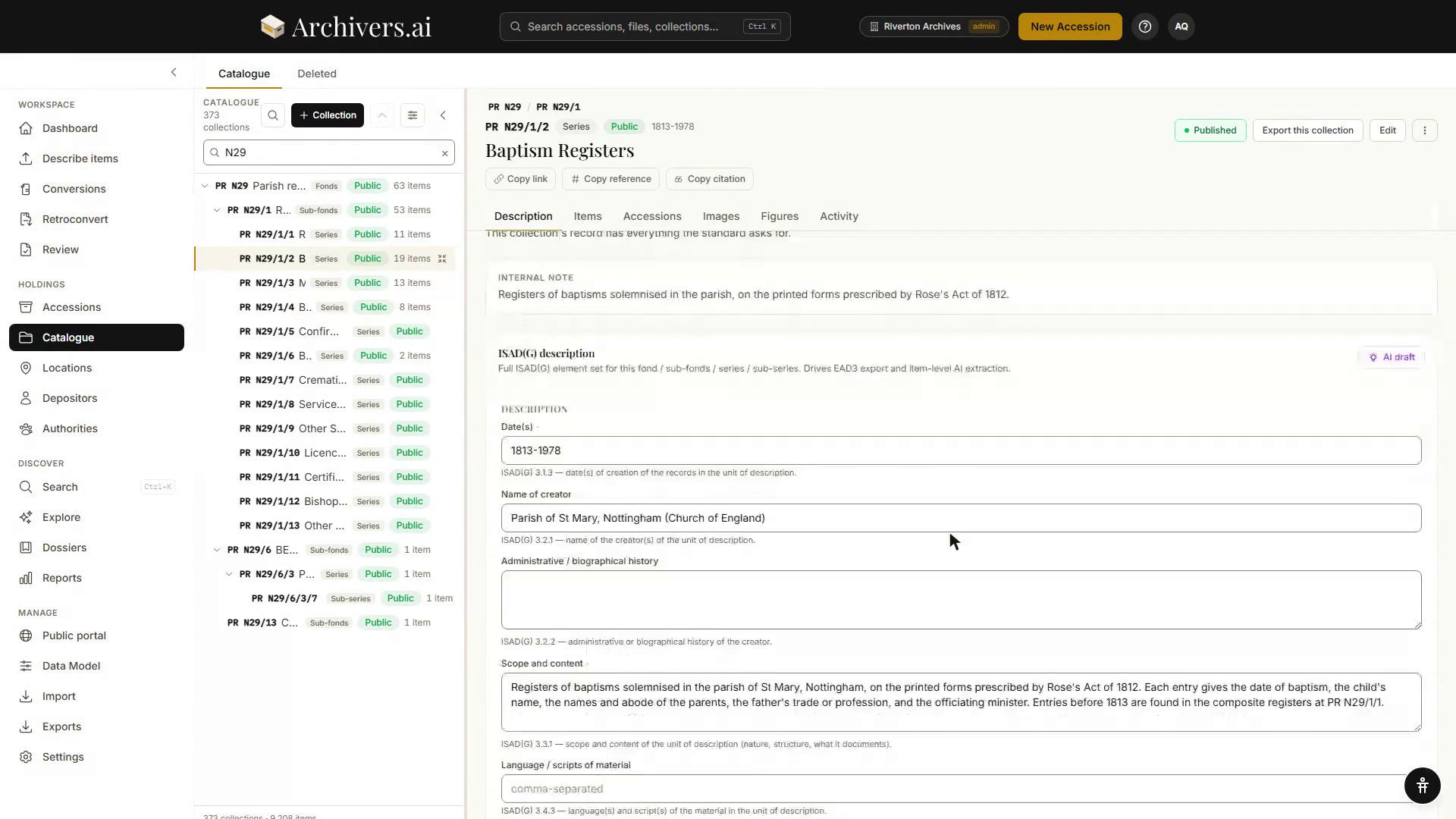
- Open Catalogue in the sidebar and select any collection in the tree — fonds, sub-fonds, series or sub-series.
- Its record opens on the right. Click AI draft in the corner of the ISAD(G) description panel. A steer box appears, with the cost of the run shown beside the button.
- Type optional steer notes (e.g. "Emphasise the photographic content, focus on 1920s–1950s school records") and click Generate draft. It can take a few minutes; you can leave the page open.
-
The AI proposes values for the ISAD(G) fields. Each proposed field shows:
- The proposed value, and, where the field already holds something, what it would replace
- Confidence — how strongly the evidence supports it (high / medium / low)
- Rationale — one sentence on what the AI inferred and from which evidence
-
Review each field. Tick the ones you want; leave the rest unticked and they are left alone. Regenerate runs it again; Discard throws the proposal away.
-
Click Apply N fields to form. The values land in the form below — still unsaved. Read them, edit anything you want to change, then click Save changes. Nothing is stored until you do.
Reading the proposal
| Label | Meaning |
|---|---|
| High confidence | Multiple lines of evidence support this value strongly (e.g. consistent dates across accessions, matching subjects across items) |
| Medium confidence | Some evidence, but gaps or ambiguity. You should review. |
| Low confidence | Sparse evidence or conflicting signals. Treat as a rough draft. |
The AI never invents facts. If the evidence doesn't ground a field, it omits it entirely. An empty proposal is not an error — it's the signal: "I couldn't ground any fields; use your own judgment."
What it's good at
- Date inference — consolidating ranges from accessions and items into a series span
- Genre and record-type identification — matching item types (correspondence, minutes, photographs) to series titles and scopes
- Creator / accumulator refinement — distinguishing different donors or creators within a fond level
- Multi-language hints — identifying dominant languages in the material (if items carry language tags)
What it's less good at
- Fine-grained administrative history — the AI infers structure from evidence, not from external knowledge. If a government department was renamed or abolished, you'll have to tell it via a steer note.
- Provenance gaps — if the accession descriptions don't mention a key creator or context, the AI can't infer it.
- Controversial or politically sensitive reclassification — these require human judgment and institutional policy, not AI drafting.
For these, use the steer box. The more specific you are, the better the proposal.
Steer notes — examples
| Goal | Steer note |
|---|---|
| Emphasis on a dominant genre | "These are predominantly correspondence; minimise the brief mentions of receipts and accounts" |
| Known date focus | "The bulk of material is 1920s–1950s; the post-1970 items are sparse and ancillary" |
| Creator / donor context | "All from the Smith family papers, but Series A is business records and Series B is personal correspondence" |
| Institutional structure | "Pre-1980 records are organised by department; post-1980 by function" |
| Reparative narrative | "This collection documents the history of [community]; centre their voices and reframe colonial-era records as contextual" |
Tips
- Small steps. Analysing a few series at a time is more accurate than trying to analyse a whole 10-level structure in one go. Once you're happy with a series, move to its children.
- Use existing metadata. If you've already written fond-level descriptions, the AI inherits them and refines series-level ones accordingly.
- Consistency check. If two sibling series come back with contradictory information, that's a signal to add a steer note clarifying the boundary.
- Re-run if you improve descriptions. Better accession-level descriptions feed better series-level proposals.
See also
- Creating your structure — build the hierarchy manually
- Importing a structure — bring in an existing hierarchy from CSV or EAD3