GDPR Export and Anonymising a Depositor
Every depositor record has two data-protection actions in its Data protection panel: exporting their data for a subject access request, and permanently anonymising their record. Both are admin only — the buttons are drawn for workspace admins, because the routes behind them refuse anyone else.
Exporting a depositor's data
Click Export data (CSV) on the depositor's page. This downloads a CSV that combines:
- The depositor's own fields — name, type, contact details, address, lawful basis, do-not-contact status
- One row per linked accession, with the depositor's details repeated on every row so the file is self-contained and can be handed to a requester as-is
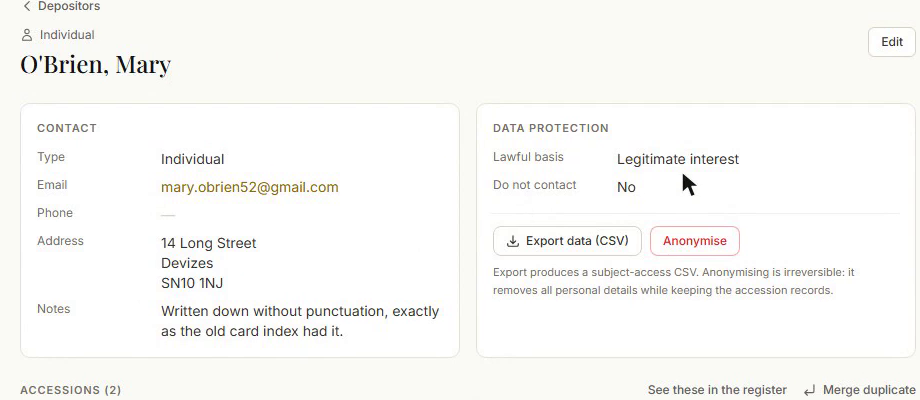
Use this to respond to a subject access request (SAR), or as a routine export before an anonymise.
Anonymising a depositor
Anonymising permanently removes a depositor's personal details while keeping the accession history intact — useful when a depositor asks to be forgotten, or after a long retention period has elapsed for a lapsed relationship.
Admin only.
- On the depositor's page, click Anonymise.
- Read the warning. It counts the real work in front of it: how many accessions and how many signed agreements their name and contact details will be removed from, and — where there are any — how many deaccession records say the material went back to them, and how many accessions carry provenance notes an archivist wrote by hand.
- Type ANONYMISE to confirm.
- Click Anonymise permanently.
What happens:
- Display name becomes "Depositor removed (GDPR)"
- Contact email, contact phone, address, and notes are all cleared
- The record is stamped with an anonymised date, shown on the depositor's page as "Personal details were removed on [date] for GDPR"
- Linked accessions keep their acquisition history — you can still see what came in, and when, just not who from
- Signed agreement documents are kept exactly as they were signed; the signing details recorded against them are cleared
- Provenance notes written by an archivist are left alone. The record says how many there are, and asks you to read them yourself for the person's name
- An Anonymised badge appears wherever the depositor is referenced (their own page and any accession's Depositor panel)
Once anonymised, the record can no longer be edited or merged, and the Anonymise action itself disappears — there is nothing left to remove.
This is irreversible
There is no way to restore a depositor's personal details after anonymising. If you need the data for anything else, export it first.