AI & Defaults
AI & Defaults is the panel where you set what the AI should know about your archive and how it should write. It is an organisation setting, not a personal one:
Sidebar → Settings → Organisation → AI & Defaults
Only admins can change it. Everyone else sees the same settings as a read-only list — "Only admins can edit these. Contact your organisation admin to change them."
As the panel says, these settings are appended to every AI prompt across the platform — file analysis, transcription, dossier generation, research and search. Set them once, and they apply everywhere.
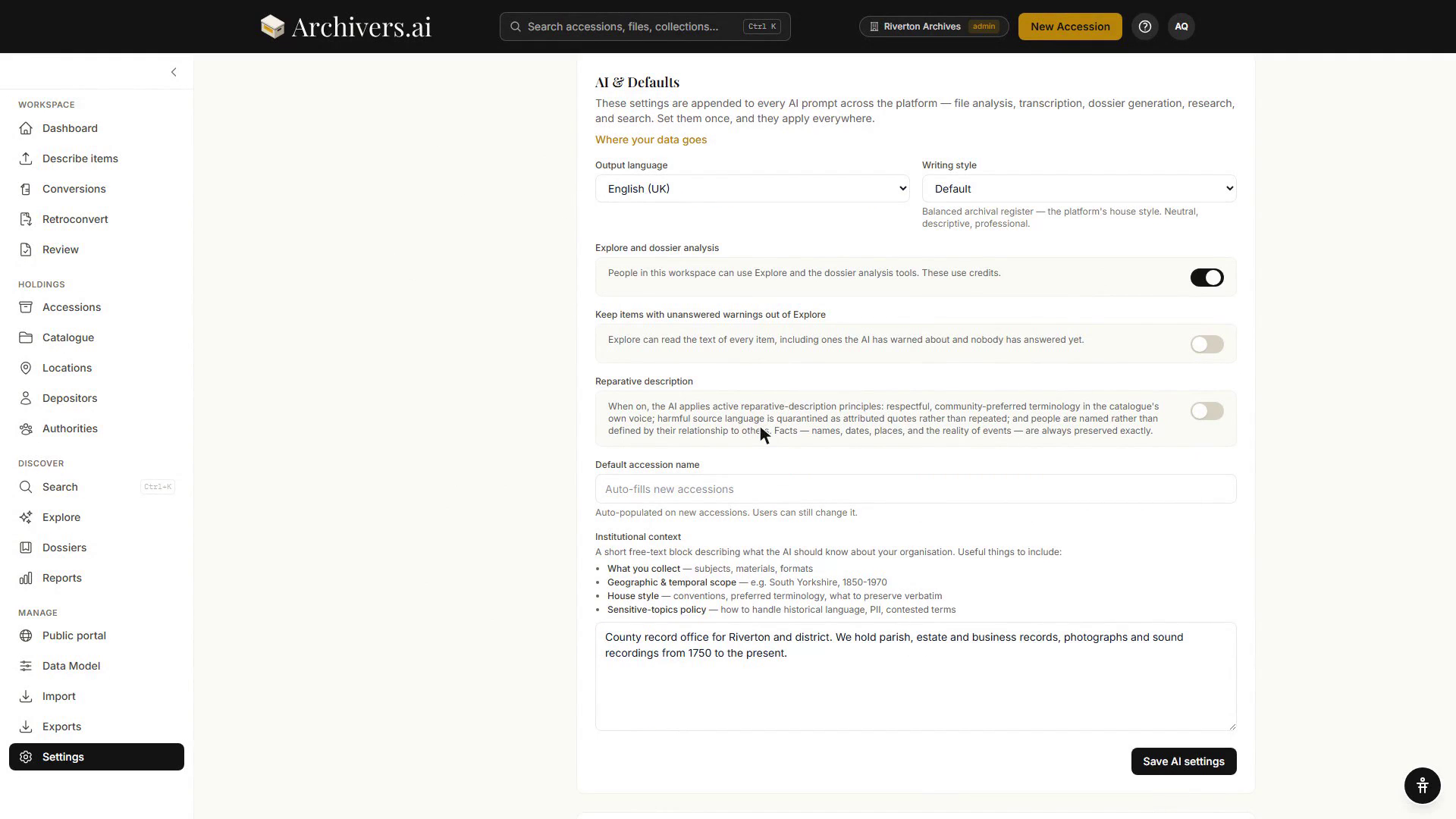
Output language
The language all AI-generated text is written in. Defaults to English (UK). The list covers English (UK, US, Canadian, Australian, Irish), Welsh (Cymraeg), Irish (Gaeilge), Scottish Gaelic (Gàidhlig), French, German, Spanish, Italian, Dutch and Portuguese, and ends with Other…, which opens a box where you can type any other language.
Output language controls what the AI writes, not what it can read — transcription and OCR detect the language of the material itself.
Writing style
The register of AI-generated text. Four options, each with an example on screen:
| Option | On screen |
|---|---|
| Default | Balanced archival register — the platform's house style. Neutral, descriptive, professional. |
| Formal academic | Full scholarly prose and precise terminology. |
| Plain English | Accessible, jargon-free, shorter sentences. |
| Concise | Telegraphic and minimal. |
Pick whatever matches your finding-aid voice.
Explore and dossier analysis
A toggle governing whether people in this workspace can use Explore and the dossier analysis tools. These use credits. Switched off, Explore and the dossier analysis tools are hidden — describing items is not affected.
Keep items with unanswered warnings out of Explore
A toggle. Left off, Explore can read the text of every item, including ones the AI has warned about that nobody has answered yet. Turn it on and Explore leaves that text out until someone answers the warning — it can still see what you have written about those items.
Reparative description
An opt-in editorial stance for descriptions of historically contested subjects. When it is on, the AI applies active reparative-description principles: respectful, community-preferred terminology in the catalogue's own voice; harmful source language quarantined as attributed quotes rather than repeated; and people named rather than defined by their relationship to others. Facts — names, dates, places, and the reality of events — are always preserved exactly.
It is orthogonal to Writing style: a register and ethics stance, not a formality level. Most relevant to archives working with contested histories, repatriation or decolonisation.
Default accession name
Auto-populated on new accessions. Set once; saves clicks on every accession you create afterwards. Users can still change it.
Institutional context
A short free-text block describing what the AI should know about your organisation. The panel suggests including:
- What you collect — subjects, materials, formats
- Geographic and temporal scope — e.g. South Yorkshire, 1850–1970
- House style — conventions, preferred terminology, what to preserve verbatim
- Sensitive-topics policy — how to handle historical language, personal data, contested terms
Example:
"Derby Local Studies Library — a public reference library focused on Derbyshire local and family history. We hold materials related to local industry, civic affairs, and family papers from c.1750 to the present."
Descriptions become more specific, dossier analyses more tailored, and Explore answers more grounded in your institutional voice.
Click Save AI settings to apply.
When to revisit
Set these once when you start using Archivers.ai, and come back when:
- You change institutional name or focus
- You're producing material for a new audience
- You realise the AI is consistently writing in a register that doesn't match yours
See also
- Your profile — your own account settings
- How AI processing works — what the AI does with these defaults