Recording a Movement or Check-Out
Movement tracking records where an accession, item, or fonds-level record has gone without changing its home location — production for a researcher, an exhibition loan, conservation, an external loan, or anything else that takes it off the shelf temporarily. Return it in one click when it comes back.
Movement tracking is available on Starter plans and above. It's a paid-tier add-on to storage locations, not a separate settings area — the controls appear directly on the record's Storage location panel and on the Locations page once your plan includes it.
Checking something out
On the record's Storage location panel, click Check out.

- Reason for movement — one of: Reading room / production, Exhibition, Conservation, Loan out, Other. (There's no Relocation here: changing a record's home shelf is the Change action on the same panel, and the movement register records that as a relocation of its own.)
- Destination — pick an existing storage location, or tick External destination and type free text (e.g. "National Conservation Service, on loan to…") for anywhere that isn't one of your own locations
- Due back (optional) — a date
- Note (optional) — e.g. "Requested by researcher R. Smith"
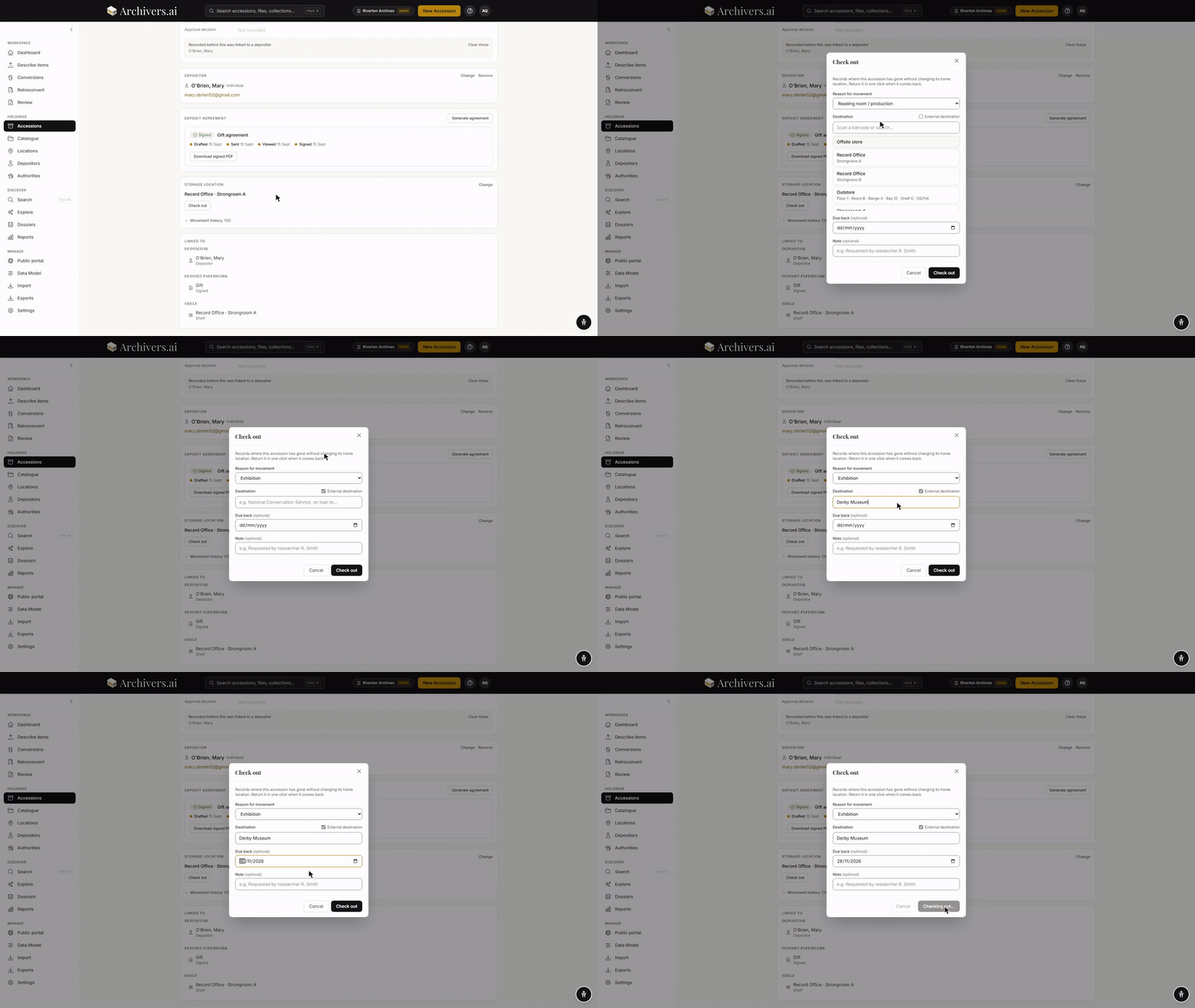
Click Check out. The record now shows an Out banner naming the destination and movement type, with its home location shown alongside — the home never changes, only the current location does.
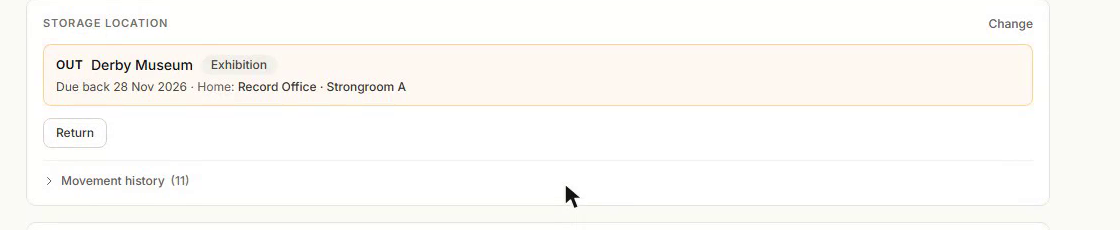
Only one open movement is allowed per record at a time: you can't check something out twice without returning it first.
Returning something
Click Return on the record's Storage location panel (or from the Out now list — see below), add an optional return note, and confirm. The record's current location reverts to its home location and the movement is closed.
Seeing everything that's out
The Locations page has an Out now tab listing every open movement organisation-wide: item, movement type, destination, who moved it and when, and due-back date. Tick Overdue only to isolate anything past its due-back date. Each row has a one-click Return for anyone with edit access.
This list is pull, not push — there are no automatic overdue notifications or reminder emails. Check the Out now tab (or the overdue count) when you want to know what's outstanding.
A location's own detail page also shows an Out from here section for anything whose home is that location but is currently away.
Movement history
Every record with a storage location has a Movement history disclosure on its Storage location panel, listing every past check-out and return with who moved it, when, the destination, and any reason given — alongside home-location changes, in one combined timeline.
Who can do what
- General and admin roles can check items out and return them.
- Reviewer and volunteer roles can see the Out now list but can't check out or return.
- Movement tracking requires your account to belong to an organisation — a personal (org-less) account has no movement UI even on a paid plan.