Playing Audio & Video
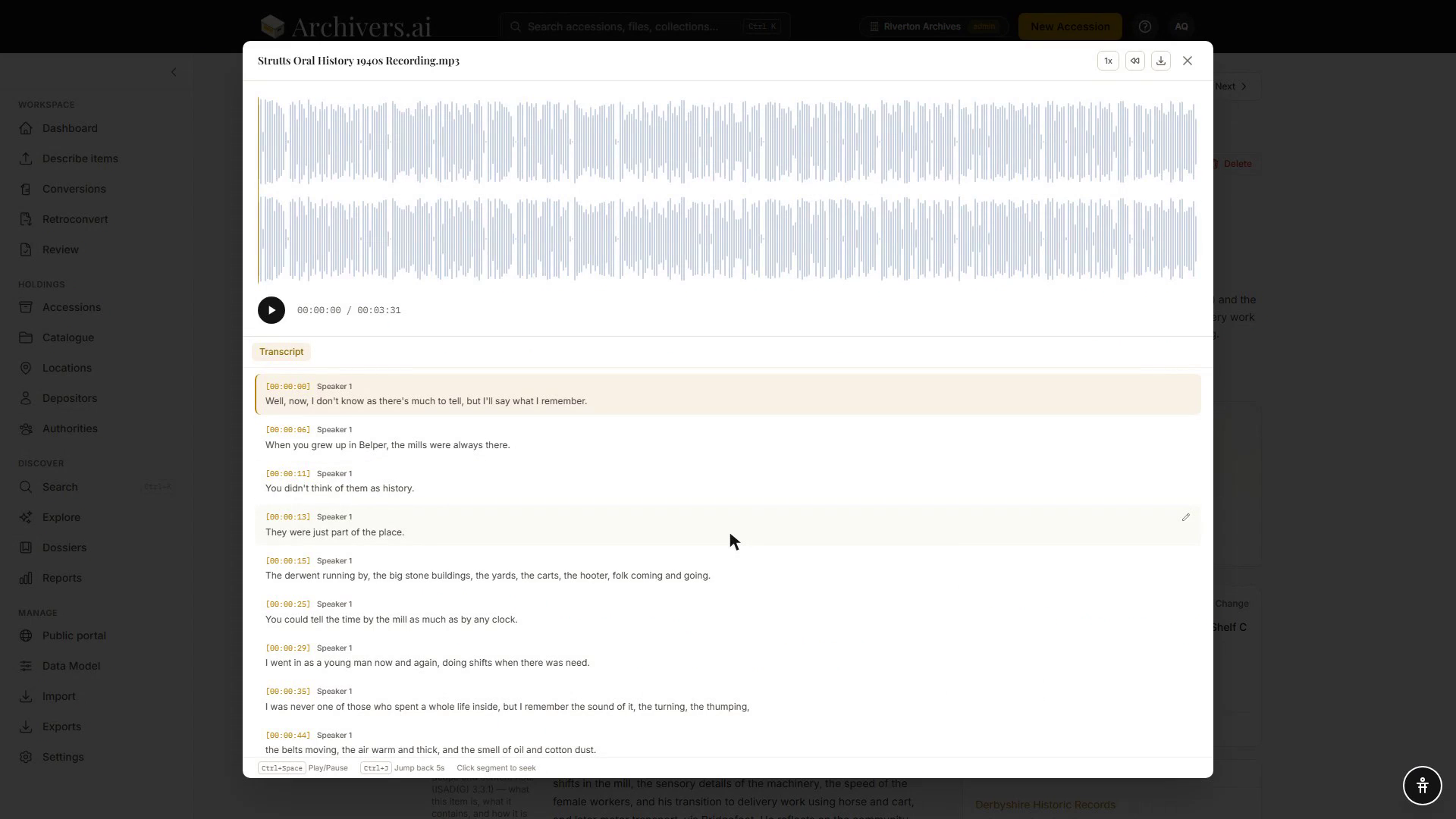
Every audio and video item opens in a media player — a full-screen overlay with the recording on one side and its transcript on the other.
Where the player opens
- On the accession page — click an audio or video file in the Items list.
- On the record page — the source preview has a button to open the player.
- On the Review desk — the same player opens beside the fields you're checking.
Press Esc to close it.
Player controls
For audio, the player draws a waveform. Click or drag anywhere on it to move through the recording. The header gives you:
- Play / pause — Ctrl/Cmd + Space also works
- Playback speed — a button showing the current speed; each click steps through 0.5×, 1×, 1.25×, 1.5×, 2×
- Jump back 5 seconds — Ctrl/Cmd + J
- Download — fetches the original upload
- Elapsed and total time
For video, the picture sits above your browser's own video control bar, which is where seeking, volume and fullscreen live. The header buttons — speed, jump back, download — work the same way.
The synchronised transcript
If the item has been transcribed (see Transcription), the transcript appears beside the player on a Transcript tab. Click any segment — or its timecode — to jump the player to that point; the active segment highlights as playback advances and the panel scrolls to follow it. Scroll by hand and following pauses; a Resume auto-scroll button brings it back.
Each segment has a pencil to correct it in place — see Transcription for what that does.
Useful patterns:
- Search within the transcript — Cmd/Ctrl+F finds words in long oral histories.
- Read instead of listen — for a one-hour interview, scanning the transcript is often faster than streaming.
Chapters
Video items also get a Chapters tab beside the transcript, listing the scenes the AI identified during processing, with a count. Click one to jump to it. The tab only appears when the item has them.
Captions
On video, the transcript is attached to the picture as a caption track and shown by default. Turning captions off or restyling them is done through your browser's own video controls — there's no separate CC button in Archivers.ai. Audio items have no caption layer; the transcript panel is the equivalent.
Limits and quirks
- Nothing is transcoded. What plays is the file you uploaded, so playability depends on your browser's codec support. AVI and MKV are accepted for upload and preservation but will often not play in the browser — try a Chromium-based browser first, and keep an MP4 access copy if in-browser playback matters.
- Very large videos may take a moment to seek.
Downloading the original
The Download button in the player header fetches the unmodified upload. Useful for sharing with editors or for cross-system migration.